Heat Engineer Software
The BooksFinance Integration forPlumbing & HeatingBusinesses

You’ve already done it once. Don’t do it again

Turn the customer, job and quote information already in Heat Engineer Software into invoices and accounting-ready information, without re-keying the job at the end of the day.

Xero supportedQuickBooks Online supportedSage supportedTide coming soonWorks alongside your accounting software


A heating engineer finishing the paperwork at the end of a job
Heat Engineer Software is trusted by thousands of businesses including professionals at
British GasBuilding MetrixEco RenewablesGrundfos
How The Books works

Keep the job and the accounts connected

The Books uses the information already captured in Heat Engineer Software system The Forge and The Builder, sends what your accounting software needs across, and keeps payment status visible back against the job.

01Use
Use the information already in the job

Customer, job and quote details are already there, ready to carry forward.

02Send
Move the financial information across

The Books matches the customer and sends the draft invoice into your connected accounting software.

03Track
Keep payment status connected to the job

See whether an invoice is unpaid, part paid or paid back in Heat Engineer Software.

Book a 10-Minute Call
To your accounting software →Customer + draft invoice
The ForgeThe Builder
The Books
XeroIntuit QuickBooksSage
← Back to Heat Engineer SoftwarePayment status + accounts / VAT information
Making Tax Digital

Digital accounting is becoming the norm. Your workflow needs to catch up.

The Books moves the customer, job and invoice details you already have into your accounting software, so going digital doesn’t mean more manual admin.

Your accounting software still manages your Making Tax Digital records and submissions.

Built into The Books

See the financial picture without leaving the job

Invoice visibility
See what’s been sent and what’s still outstanding

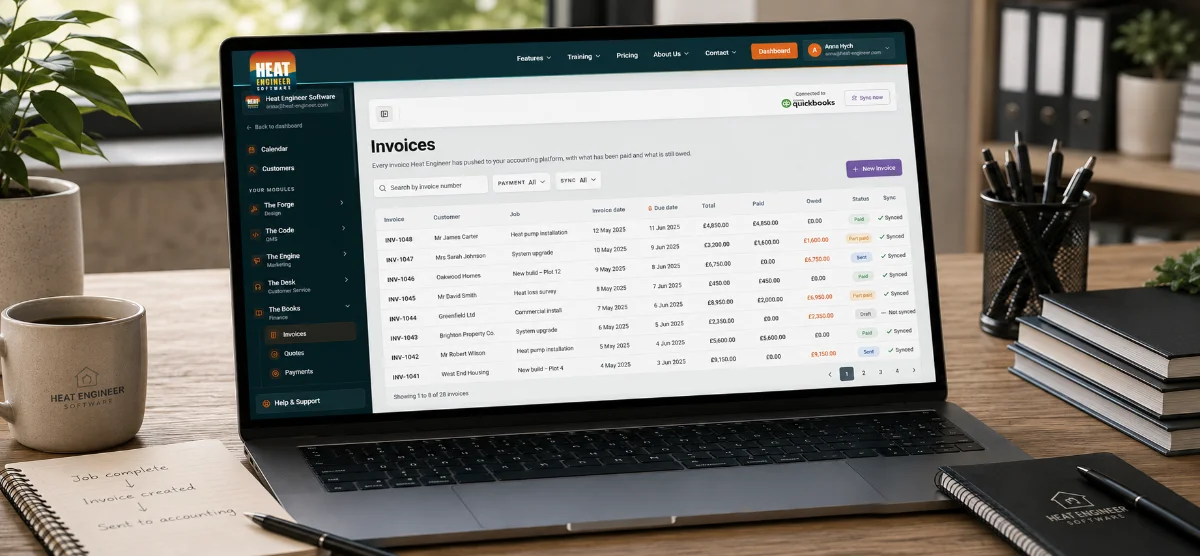
View invoices against the job, including totals, amounts paid and what is still owed.

Payment status
Know when the money comes in

See whether an invoice is unpaid, part paid or paid without needing to check the accounting platform separately.

Accounting connections
Keep the software your accountant already uses

Connect with Xero, QuickBooks Online or Sage while your accounting platform remains the financial system of record.

Customers & tax
Keep the right account information aligned

Match customer records and use the accounts and VAT rates from your connected accounting software.

Simple pricing

Switch The Books on when you need it

The Books · monthly
£5/month + VAT

Connect your Heat Engineer Software workflow to your accounting software and keep job information moving into invoicing without re-entering it.

Get The Books
The Books · yearlySave 10%
£4.50/month equivalent
£54 billed annually + VAT

The same complete Books, paid once a year.

Get The Books
IncludesXero, QuickBooks & Sage integrationDraft invoice syncPayment status trackingCustomer & account matchingNo feature tiersWorks with jobs and invoices created in Heat Engineer Software.
The more you add, the more you save

Build your Heat Engineer Software package around the way your business works, with better value when you use more of the platform.

Explore Other Products
Keep the money side visible

Know what’s been invoiced, paid and still outstanding

Keep invoice and payment status connected to the job, without jumping between Heat Engineer Software and your accounting platform.

A heating engineer closing off a finished job
  • Invoice synced · INV-1248 · QuickBooks
  • Payment status · Part paid · £840 outstanding
  • Customer matched · Mr & Mrs Taylor
  • Accounts up to date · VAT rate applied
The Books FAQ

Everything to know about The Books

See the financial status without leaving the job

Keep invoice and payment information linked to the work, so it’s easier to see where every job stands financially.